Alternative Formats
Students currently enrolled at Austin Peay State University and registered with the Disability Student Success Center, who have Alternative Formats listed as an accommodation, may request books. This page walks through how to request alternative formats once approved for alternative format accommodations. If you have any questions or need assistance with submitting requests, please get in touch with the Disability Student Success Center (DSSC). If you have not submitted your accommodations agreement form, you will not be able to use alternative formats through AIM. Please make sure you have done this before attempting to request alternative formats.
Alternative Formats Program
Alternative formats requests are fulfilled by DSSC in the order they are received, so remember to submit your alternative format requests as soon as possible. Students receive an email notification when their request has been completed and is available to download through AIM. Due to copyright laws, students are required to have purchased the books they request in alternative formats. The Alternative Formats Program AFP is not a free book program. The only exception to this is if the book is available through the UChicago Library, or is open-source, or if the instructor has provided the book to the class.
AFP Guidelines
-
The Book in Alternate Format program is for use in connection with a course in which the student is currently registered.
-
All students enrolled in the program are responsible for purchasing a copy of the textbook.
-
Books in Alternate Format are solely for educational purposes.
-
Students are not permitted to copy, duplicate, or distribute any book requested through the Alternate Format program for requested gain or any other purpose, in compliance with the Copyright Revision Act of 1976.
-
Any violation of the above agreement may be considered a violation of the University’s Code of Conduct and may result in penalties. Violations may also constitute a violation of federal and/or state laws and may result in civil or criminal prosecution, payment of fines or other monies to the copyright holder, and/or incarceration.
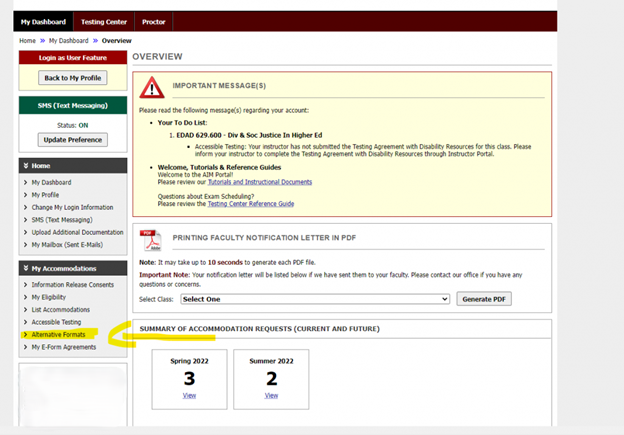
To make a request, check the status of requested materials, or complete other tasks for alternative format materials, select the Alternative Formats link in the My Accommodations box on the left-hand side of the AIM portal. NOTE: Students must have already requested their accommodations for the semester for which they are requesting books in order for alternative format options to be available.
Accommodation Portal Tutorials
Alternate Format Program
Adding a new request for materials
From the Alternative Formats page, students can make requests for materials required for a class. This may also apply for articles provided in class or research materials. The bookstore may list several versions of the same item (print versus e-book). Review carefully each item before requesting it as to avoid duplicate requests. Please note: We do not require students to submit proof of purchase unless requested by the textbook publisher or one of our partners.
-
Log in to the AIM Student Portal. There is a shortcut on the DSSC website
-
Select the Alternative Formats link in the My Accommodations box on the left-hand side of the AIM portal
-
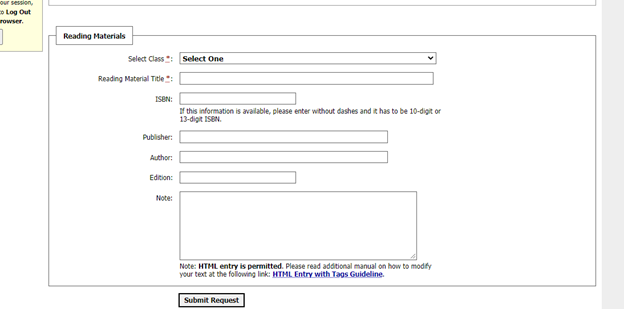
From the Alternative Formats page, Complete the Additional Book or Reading Materials form with as much detail as possible for each item being requested. (The more information provided, the quicker the request can be fulfilled).
-
Select the Class from the drop down menu that you are requesting a book for.
-
Reading Material Title
-
Enter the ISBN If this information is available, please enter without dashes and it has to be 10--digit or 13--digit ISBN.
-
Enter the Publisher
-
Enter the Author
-
Enter the Edition
-
Enter any notes for DSSC
-
-
Once submitted, students can track the status of each item on the Alternative Formats page.
-
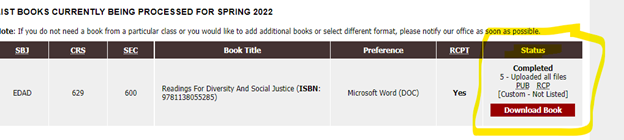
Once your request has been fulfilled, you will receive an email with a download link to access your book. A “Download Book” button will also appear next to the book request on the Alternative Formats page. (The status will also say “Completed.”)
-
Repeat until you have requested all required books.
-
Inform DSSC immediately if there are any problems with the alternative formats provided.
Downloading requested materials as they are completed
DSSC requires students to read and acknowledge an Alternative Format Services Agreement when approved for this accommodation. The agreement explicitly states students are not to share materials with anyone and are to delete alternative format versions of materials once they have completed the course and/or no longer have possession of their original copy.
-
From the Alternative Formats page, review the list of materials requested.
-
When the status of a request is partially completed or finished entirely, select the red, download button to view available files.
-
Click the “Download Book” button. This will direct you to a Box folder which contains the alternative format files requested.
-
Download the files to your computer to open and read with your preferred computer program.

AFP Book Download