


Coursedog Training Documents
Coursedog Academic Catalog and Curriculum will offer new and exciting options for viewing the Academic Catalog and updating course and program information.
Below you will find training documents which correspond to each module to assist you with reviewing and updating.
Academic Catalog Procedures
- Navigate to Coursedog Login
- https://app.coursedog.com
- Sign in with your APSU credentials (utilizes single sign-on)
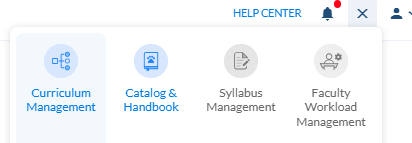
- Navigate to the products icon in the top right corner and select Academic Catalog
& Handbook
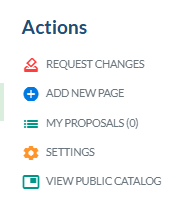
- To see the full Academic Catalog, you will navigate to the right and select View Public
Academic Catalog
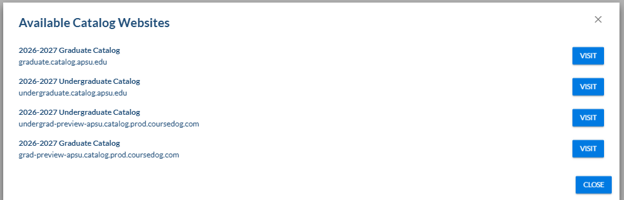

- At this point, you will be able to search courses and programs online to see how they display.
- Navigate to apsu.edu
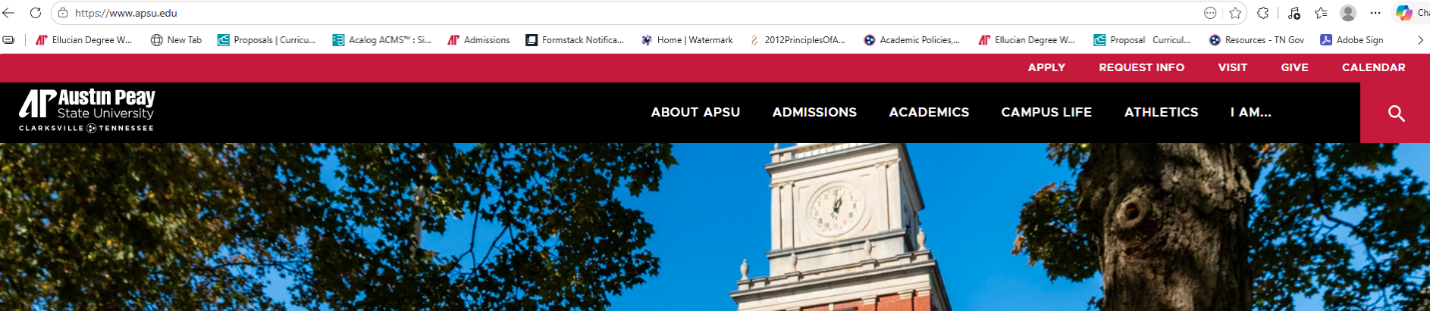
- Select the hourglass on the right and then click A to Z Index

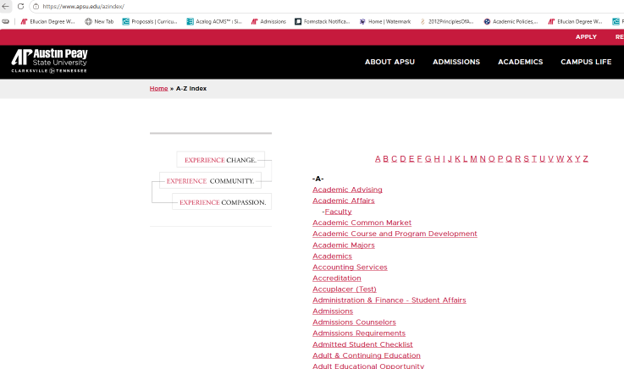
- Select "B" and Catalogs Graduate and Undergraduate
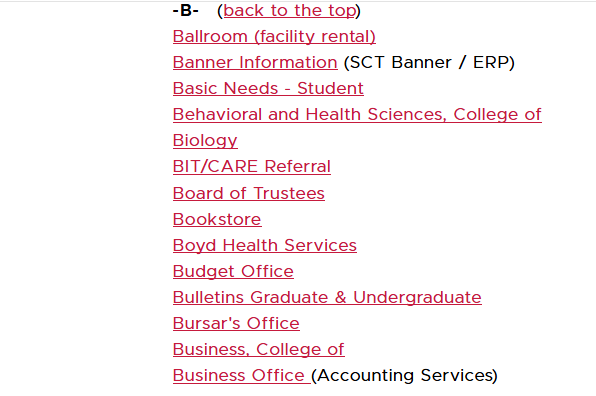
- Locate the appropriate Academic Catalog
- At this point, you will be able to search courses and program online to see how they display.
- Navigate to app.coursedog.com
- Sign in with your single sign-on credentials
- Click the Products Icon in the top right corner.
- Select Academic Catalog and Handbook
- On the left side, navigate to Pages
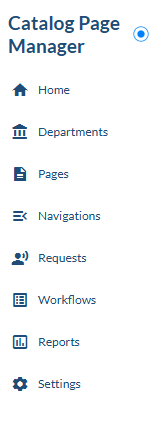
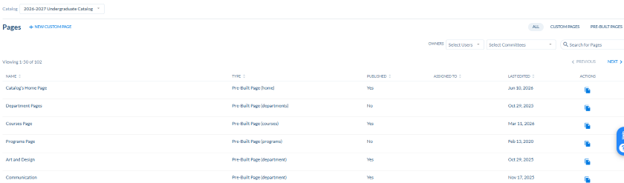
- This will load a larger page that will show all pages, custom pages, or pre-built pages
- Scroll through the listing and select the page you would like to view
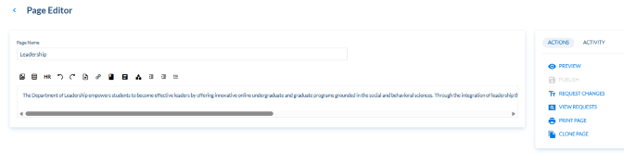
- Once you have opened the page you would like to view/edit, you will see otpionson
the right side for editing
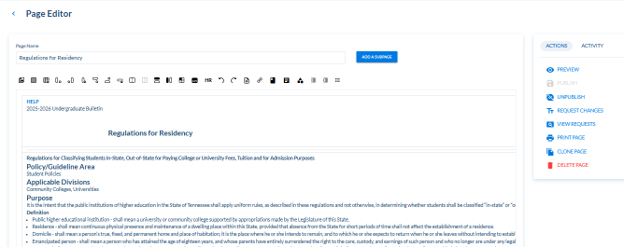
- Select Request Change
- The document will open in an edit version for you to make appropriate updates.
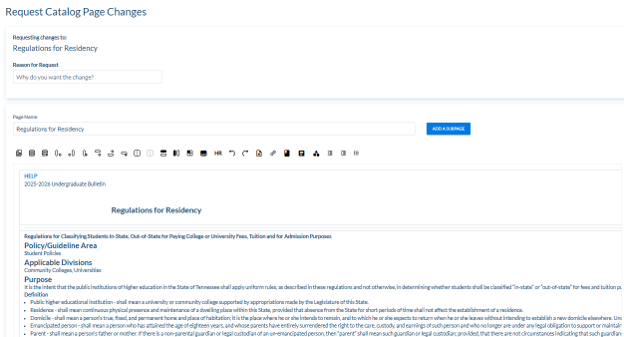
- Once you have made the necessary changes, click "Submit Changes"
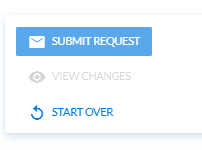
- The workflow will be activated to review and approve the requested change
- Navigate to app.coursedog.com
- Sign in with your single sign-on credentials
- Click the Products Icon in the top right corner.
- Select Academic Catalog and Handbook
- On the left-hand side, select Requests.
- Information for requests will load in the middle.
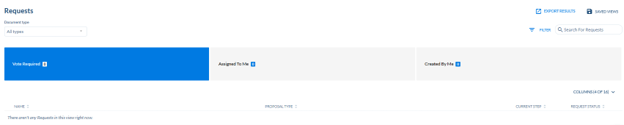
- Select "Assigned to Me"

- Click on the proposal you wish to review
- Approve or Reject
Additional information:
- We do have a workflow set up for changes to the Catalog. We will begin using this
for the year 2027-2028 for custom and departmental pages.
- Individuals can request a change if the departmental page will route to the chair for approval and then to me. If a custom page, it will go from the author to me for approval.
- Those will route to me for review and approval.
- For 2026-2027, please send any edits to me through email, obrienjr@apsu.edu.
- Degree Maps are now housed within the program information and will also be linked through Program Finder.
Curriculum Procedures
- Go to app.coursedog.com
- Log in utilizing your single sign-on information.
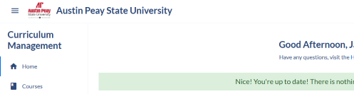
- Once you are logged in, you will want to ensure you are in the Curriculum Management
tool (the name of the tool will display in the top left corner).
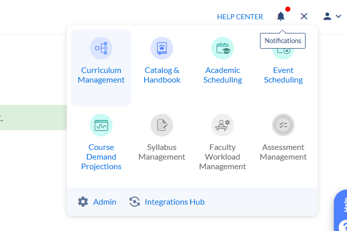
- If you are not in the Curriculum Management tool, you will want to navigate to the
top right and select the grid icon. It will then display all of the options available
to you. Navigate to Curriculum Management and select.
- If you are not in the Curriculum Management tool, you will want to navigate to the
top right and select the grid icon. It will then display all of the options available
to you. Navigate to Curriculum Management and select.
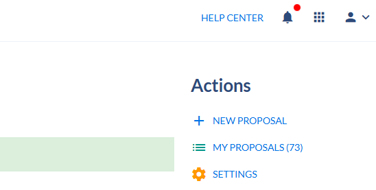
- From the main page, navigate to the right side and select New Proposal.
- Once you have selected New Proposal a drop down box will appear in the middle of the
screen.
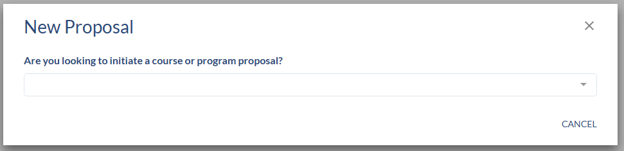
- From here, you will want to select Course, and then it will prompt you through a few
other questions to ensure you are directed to the appropriate course form. For the
new course, you will want to answer No to the first question and then Yes to the second.
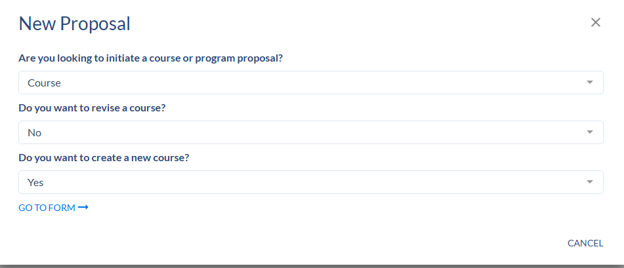
- At this point, you will want to input the course information into the Select Course area and select GO TO FORM:
- You will now need to complete all required fields on the new course form.
- Once you have completed the form, select the SUBMIT PROPOSAL button on the right.
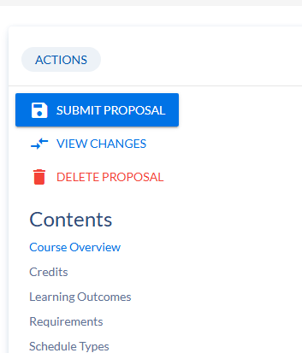
- Once you have submitted your proposal, it is in the workflow process and will be routed accordingly for approval.
- Go to app.coursedog.com
- Log in utilizing your single sign-on information.
- Once you are logged in, you will want to ensure you are in the Curriculum Management
tool (the name of the tool will display in the top left corner).
- If you are not in the Curriculum Management tool, you will want to navigate to the
top right and select the grid icon. It will then display all the options available
to you. Navigate to Curriculum Management and select.
- If you are not in the Curriculum Management tool, you will want to navigate to the
top right and select the grid icon. It will then display all the options available
to you. Navigate to Curriculum Management and select.
- From the main page, navigate to the right side and select New Proposal.
- Once you have selected New Proposal, a drop-down box will appear in the middle of
the screen.
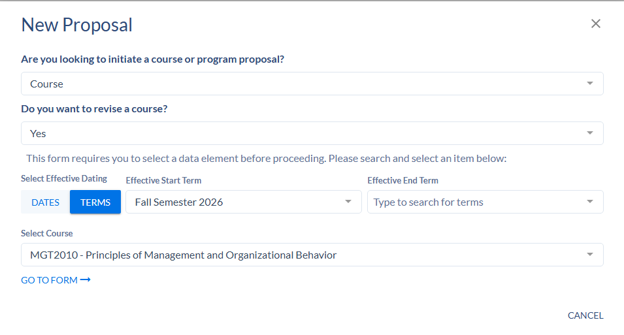
- From here, you will want to select Course, and then it will prompt you through a few
other questions to ensure you are directed to the appropriate course form. For these
course revision instructions, select yes to the second question; it will then prompt
you for additional information.
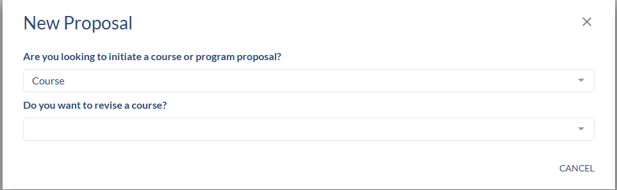
- At this point, you will want to input the course information into the Select Course
area and select GO TO FORM:
- You will now see the full course overview and are able to make changes as necessary.
Please note: all required items must be completed before submitting the course revision.
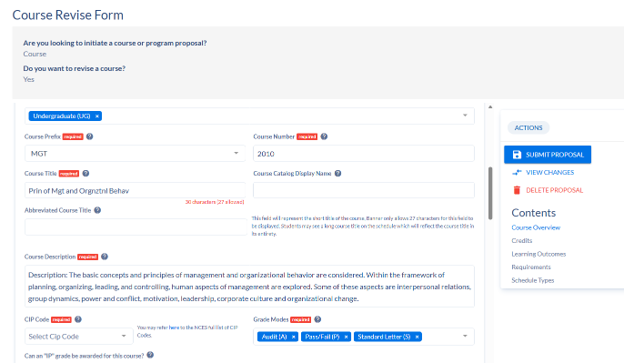
- Once you have completed all revisions, select the SUBMIT PROPOSAL icon on the right-hand
side.
- Once you have submitted your proposal, it is in the workflow process and will be routed accordingly for approval.
- Go to app.coursedog.com
- Log in utilizing your single sign-on information.
- Once you are logged in, you will want to ensure you are in the Curriculum Management
tool (the name of the tool will display in the top left corner).
- If you are not in the Curriculum Management tool, you will want to navigate to the
top right and select the grid icon. It will then display all of the options available
to you. Navigate to Curriculum Management and select.
- If you are not in the Curriculum Management tool, you will want to navigate to the
top right and select the grid icon. It will then display all of the options available
to you. Navigate to Curriculum Management and select.
- From the main page, navigate to the right side and select New Proposal.
- Once you have selected New Proposal a drop down box will appear in the middle of the
screen.
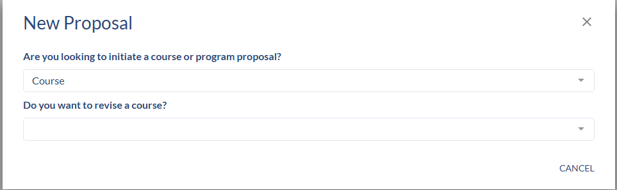
- From here, you will want to select Course, and then it will prompt you through a few
other questions to ensure you are directed to the appropriate course form. For these
course delete/inactivate instructions, you will want to select no to the second and
third question, and then it will prompt you for additional information.
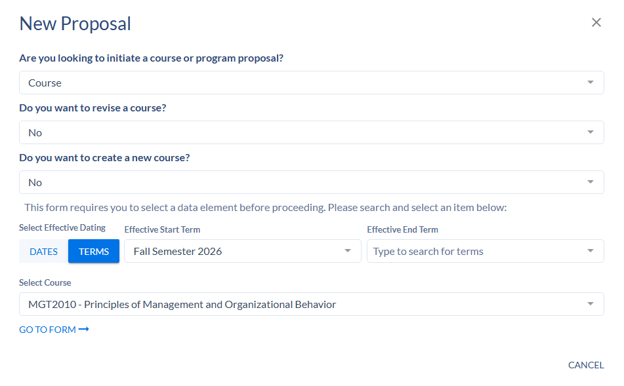
- At this point, you will want to input the course information into the Select Course
area, and select GO TO FORM:
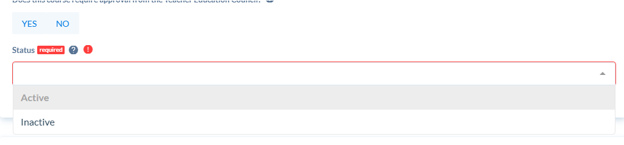
- You will now see the full course overview. You will only need to update one field
on this form. Under Status, you will drop the box down and select inactive. You will
receive an error message to submit the form if this is not selected.
- Once you have updated the status to inactive, select the SUBMIT PROPOSAL button on
the right
- Once you have submitted your proposal, it is in the workflow process and will be routed accordingly for approval.
- Go to app.coursedog.com
- Log in utilizing your single sign-on information.
- Once you are logged in, you will want to ensure you are in the Curriculum Management
tool (the name of the tool will display in the top left corner).
- If you are not in the Curriculum Management tool, you will want to navigate to the
top right and select the grid icon. It will then display all the options available
to you. Navigate to Curriculum Management and select.
- If you are not in the Curriculum Management tool, you will want to navigate to the
top right and select the grid icon. It will then display all the options available
to you. Navigate to Curriculum Management and select.
- From the main page, navigate to the right side and select New Proposal.
- Once you have selected New Proposal, a drop-down box will appear in the middle of
the screen.
- From here, you will want to select Program, and then it will prompt you through a
few other questions to ensure you are directed to the appropriate course form. For
a new program, you will enter No for the first question and Yes for the Second Question.
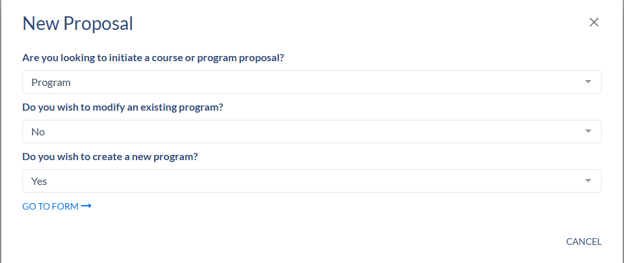
- At this point, you will want to select GO TO FORM:
- You will now need to complete all components of the New Program Form. The information
contained in this form is required by THEC for approval, and therefore, all information
must be entered accordingly.
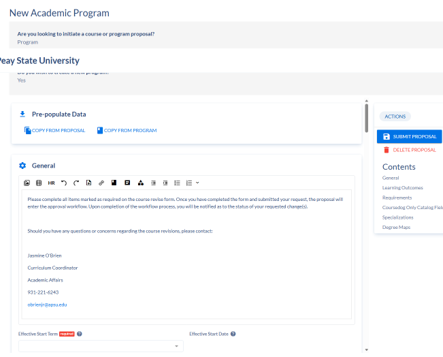
- Once you have completed the form, select the SUBMIT PROPOSAL button on the right
- Once you have submitted your proposal, it is in the workflow process and will be routed accordingly for approval.
- Go to app.coursedog.com
- Log in utilizing your single sign-on information.
- Once you are logged in, you will want to ensure you are in the Curriculum Management
tool (the name of the tool will display in the top left corner).
- If you are not in the Curriculum Management tool, you will want to navigate to the
top right and select the grid icon. It will then display all the options available
to you. Navigate to Curriculum Management and select.
- If you are not in the Curriculum Management tool, you will want to navigate to the
top right and select the grid icon. It will then display all the options available
to you. Navigate to Curriculum Management and select.
- From the main page, navigate to the right side and select New Proposal.
- Once you have selected New Proposal, a drop-down box will appear in the middle of
the screen.
- From here, you will want to select Program, and then it will prompt you through a
few other questions to ensure you are directed to the appropriate course form. For
a new certificate, enter No for the first two questions and yes to the last.
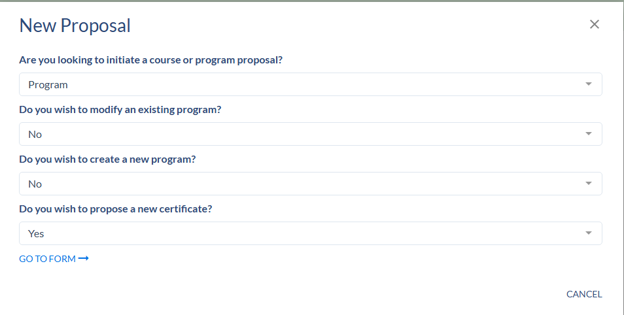
- Now, you will want to select GO TO FORM:
- You will now be able to update create the new Certificate
- Entering requirements:
- You will want to scroll down to the requirements section.
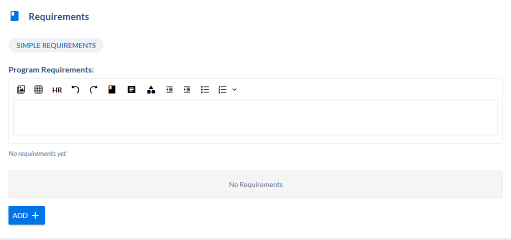
- Select the blue add button and then select requirement
- A box will now appear and say untitled requirement.

- Click on the box to expand.
- You will now need to enter the requirement level from the drop down. Select Program
Requirements. The box will close and you will need to reopen before proceeding.
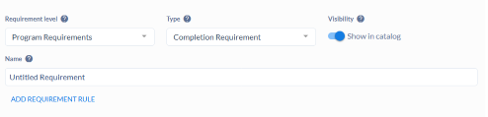
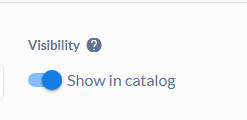
- Make sure the Show in Academic Catalog button is toggled to the right:
- Under the Name, you will want to enter the name of the certificate.

- You will want to scroll down to the requirements section.
- Entering requirements:
- Now, click Add Requirement Rule under the name.
- Here is where you will actually build by selecting the rule condition, the courses,
and naming the rule.
- If you have a certificate with only required courses, utilize “complete all of” and title the Rule Name Core.
- If you have a certificate that requires courses and electives, you will want to select Full All of…, then you will build to insert rules. Complete all and complete “X” from.
- To enter the courses for either situation, you will navigate to Select Course, type in the prefix and number, highlight, and click to add.
- Once you have completed all edits, select the SUBMIT PROPOSAL button on the right
- Once you have submitted your proposal, it is in the workflow process and will be routed accordingly for approval.
- Go to app.coursedog.com
- Log in utilizing your single sign-on information.
- Once you are logged in, you will want to ensure you are in the Curriculum Management
tool (the name of the tool will display in the top left corner).
- If you are not in the Curriculum Management tool, you will want to navigate to the
top right and select the grid icon. It will then display all of the options available
to you. Navigate to Curriculum Management and select.
- If you are not in the Curriculum Management tool, you will want to navigate to the
top right and select the grid icon. It will then display all of the options available
to you. Navigate to Curriculum Management and select.
- From the main page, navigate to the right side and select New Proposal.
- Once you have selected New Proposal a drop down box will appear in the middle of the
screen.
- From here, you will want to select Program, and then it will prompt you through a
few other questions to ensure you are directed to the appropriate course form. For
a program modification, you will answer Yes to the question, and then it will prompt
you to search for a program.
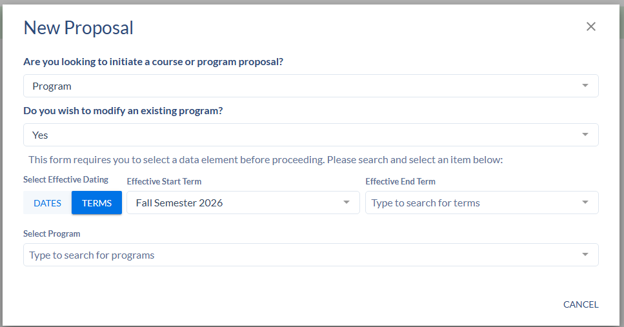
- To search for your program, you will want to type in the major name. A list of programs
will appear. Some may show as inactive because old data was imported from Banner,
so you will want to ensure you are selecting an active program. If you would like
to select the Degree Program, you will select the item with the degree in front of
the code. If you are looking for a minor, you will select the abbreviated Code with
a dash, followed by the full name.
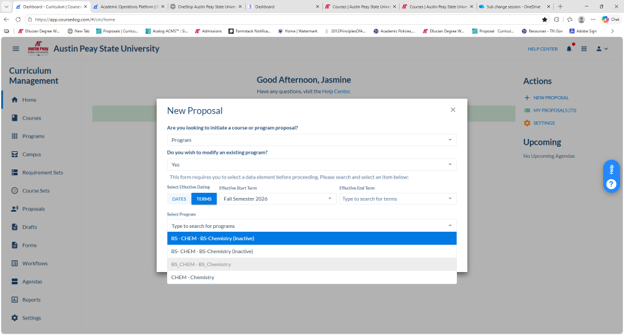
- Once you have selected your program, you will want to select GO TO FORM:
- You will now be able to update items for the program.
- Updating under requirements:
- You will want to scroll down to the requirements section.
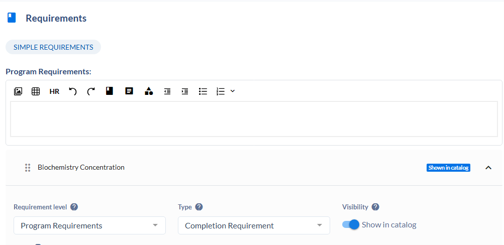
- Select your major or appropriate concentration and expand the bar
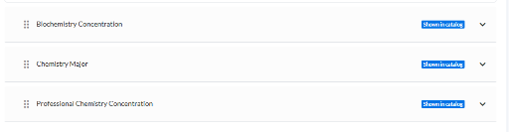
- Select edit by the group where the edit needs to be made
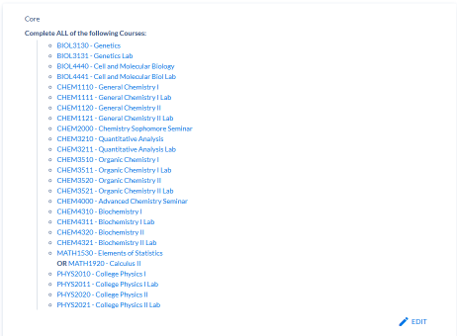
- Once you have selected edit, the area will expand.
- If you would like to remove a course, you will click the red “X” to the right.

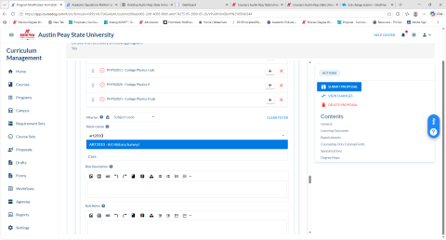
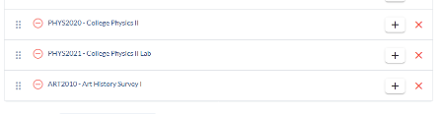
- If you need to add a course, scroll down to where you are able to see select course.
Type in the appropriate course, highlight and add by clicking. The newly added course
will appear at the bottom of the requirements. You may select the grid icon to the
left to drag and drop to the appropriate alpha/numeric order.

- You will want to scroll down to the requirements section.
- Updating under requirements:
- Once you have completed all edits, select the SUBMIT PROPOSAL button on the right
- Once you have submitted your proposal, it is in the workflow process and will be routed accordingly for approval.